What are the different methods to create a prospect list?
When creating a campaign, you will need to import prospects into Flowkon by creating a new prospect list. There are many types of prospects lists you can use to load prospects, so depending on your requirements, you should find the right option for you.
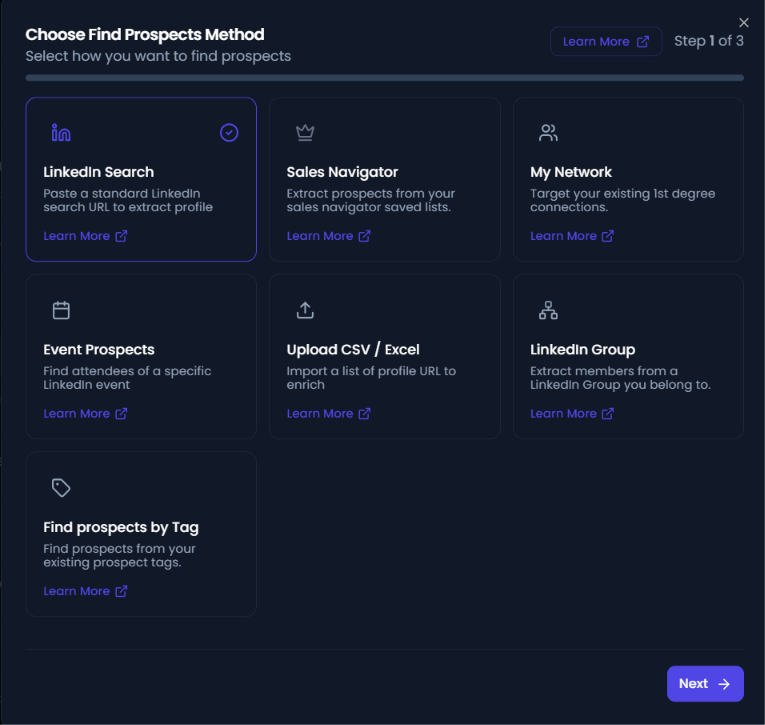
Linkedin url : A LinkedIn search URL in Flowkon is useful if you do not have a paid subscription within LinkedIn and will be loading in users from the search bar in LinkedIn. You can use multiple filters depending on the type of lead you are looking for.
Csv/excel import: If you have a list of prospects in a CSV file, you can import them into Flowkon as long as each prospect includes a valid LinkedIn profile URL. The LinkedIn profile URL is the only required field, while any additional columns will be imported and can be used to personalize your outreach.
To upload your prospects, follow the CSV import instructions here. Before importing, make sure your file follows the required format. We recommend using the example CSV file as a reference to ensure your data is structured correctly.
Sales navigator: If you have a LinkedIn Premium subscription with access to Sales Navigator, you'll be able to use a much wider range of search filters compared to a standard LinkedIn search. Using more filters helps you build a highly targeted lead list, making it easier to personalize your outreach and improve engagement. While a paid LinkedIn subscription is not required to use Flowkon, Sales Navigator offers additional capabilities that can significantly enhance your prospecting efforts.
Event: LinkedIn Events are a great way to identify and engage with highly relevant prospects. Whether it's an industry webinar, a conference, a networking event, or a competitor-hosted session, event attendees often share common interests and professional goals, making them valuable outreach targets.
With Flowkon, you can build lead lists from LinkedIn event participants and add them directly to your outreach campaigns. This allows you to connect with people who are already engaged in topics related to your industry, product, or service.
My network : This lead source helps you warm up your LinkedIn account by reaching out to profiles that LinkedIn recommends under the "People You May Know" section. These suggestions can be found in the My Network tab and are typically based on your existing connections, industry, interests, and professional network.
Find Prospects by tags: Find prospects by tags allows you to quickly create a lead list using tags that have already been assigned to your prospects. This is useful when you want to group and target prospects based on categories such as industry, campaign, priority, event, or any custom tags you've created. You can select one or multiple tags, and Flowkon will create a search containing all prospects that match the selected tags.
LinkedIn Group Search: The LinkedIn Group Search option allows you to import prospects from a LinkedIn group by providing the group's URL. This feature helps you reach members of relevant LinkedIn groups who match your target audience.
To use this option, copy the URL of the LinkedIn group you want to target and paste it into the search field. Flowkon will retrieve the eligible group members from that group, and you can then review, filter, and add them to your campaign.
This feature is particularly useful for targeting communities built around specific industries, interests, professions, or topics, enabling you to connect with highly relevant prospects.