-p-2000.png)
How to create a template flow from scratch?
Once the campaign is created, if you selected the Create from Scratch option for the template flow, you will be redirected to the Campaign Builder tab. In the Campaign Builder tab, you can create and customize your campaign flow based on your requirements. You can add nodes, connect actions, and configure the workflow for the campaign.
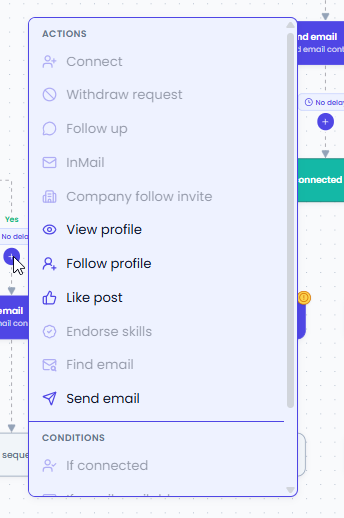
- To add action nodes to the flow, click on the + icon available in the builder. After clicking the + icon, you can select and add the required action node to the campaign flow.

- While adding action nodes, you will notice that some nodes are enabled and some are disabled.
- If a node is disabled, hover over the node to see the reason why it cannot be added at that position in the flow.
- For example, the Connect action cannot be added on the positive side of the If Connected node because the prospect is already connected, so adding the Connect action again is not required.
- Based on the flow logic, only valid and applicable nodes will be enabled for selection.
- Before adding a node, check whether the action is suitable for that particular stage of the campaign flow.
- Some action nodes such as Like Post, View Profile, and Follow Profile can be added anywhere in the flow, as they are independent actions.