-p-2000.png)
Reconnect LinkedIn Account After Upgrading to Sales Navigator
If you upgrade your LinkedIn account from a standard LinkedIn subscription to a Sales Navigator subscription after connecting it to Flowkon, you will need to reconnect your LinkedIn account to ensure the platform recognizes the upgrade.
Why is reconnection required?
- Flowkon identifies your LinkedIn account type based on the connection established during the initial authorization.
- If your account is upgraded to Sales Navigator after the connection is made, Flowkon may continue to recognize it as a standard LinkedIn account.
- Sales Navigator features and capabilities will not be available until the account information is refreshed.
How to update your account in Flowkon
- Click on your profile
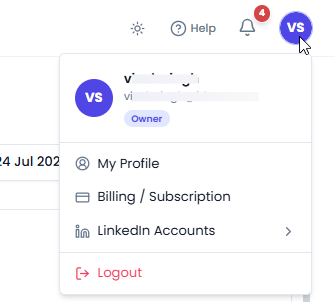
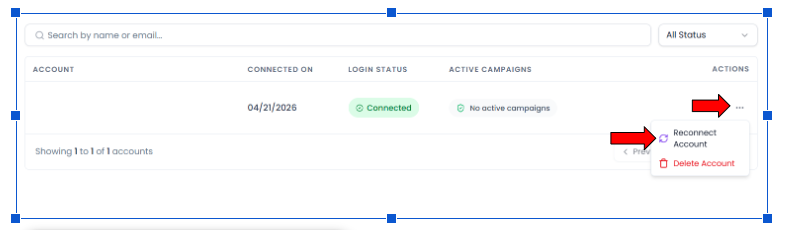
2. On the Connections.locate your LinkedIn account. In the Actions column, click the three-dot menu (⋮). Select Reconnect Account from the dropdown menu.
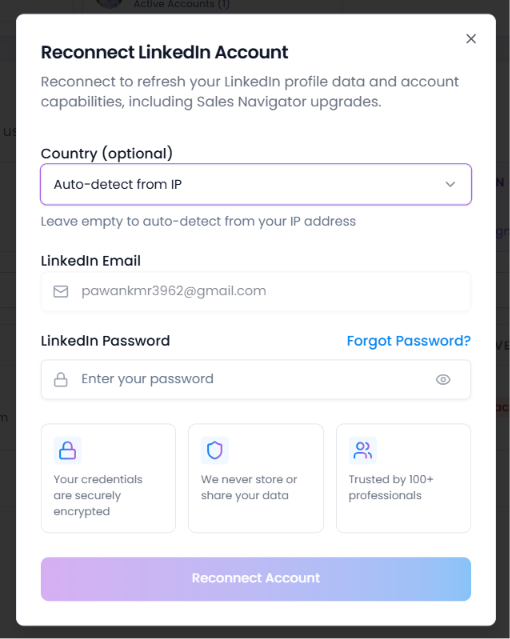
Reconnect Account pop-up window will appear. Enter the LinkedIn email address and password associated with your Sales Navigator account. Click Reconnect Account to complete the reconnection process.
Once the account has been successfully reconnected, Flowkon will detect your active Sales Navigator subscription and enable the associated Sales Navigator features within the platform.