Campaign status breakdown in dashboard
The Campaign Status Breakdown section provides a detailed overview of all your LinkedIn campaigns in one place. It allows you to monitor the status and performance of every campaign without opening them individually. This section helps you quickly identify which campaigns are currently running, which are still in draft, which have been paused or archived, and how each campaign is performing.
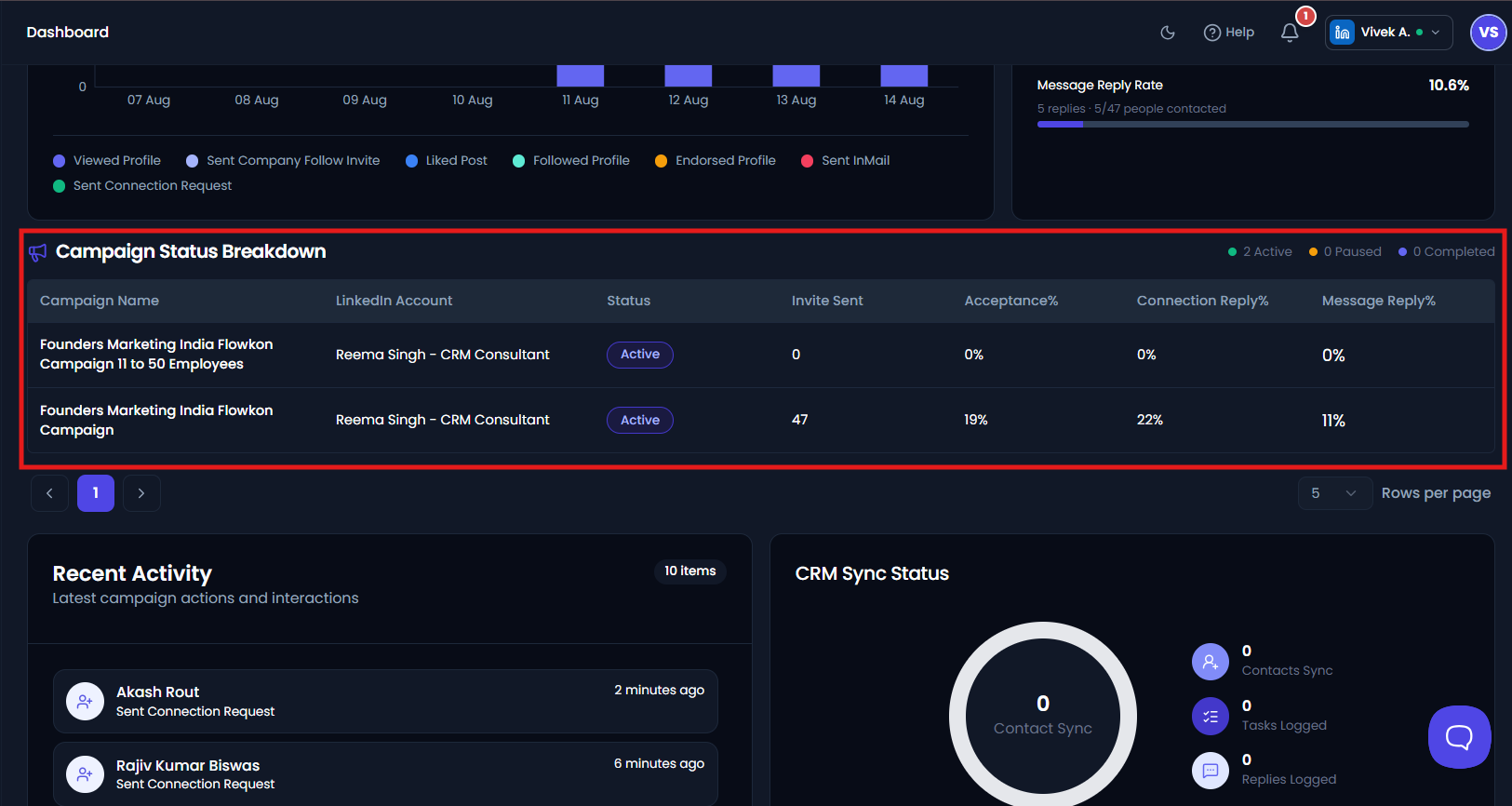
Each row in the table represents a single campaign and displays the following information:
Campaign Name
Displays the name of the campaign, making it easy to identify and manage multiple campaigns. If a campaign has not been renamed, it may appear with a default name such as Untitled Campaign along with the creation date and time.
LinkedIn Account
Shows the LinkedIn account associated with the campaign. If multiple LinkedIn accounts are connected to your Flowkon workspace, this column helps identify which account is being used to run each campaign.
Campaign Status
Displays the current status of the campaign.
Possible statuses include:
- Active – The campaign is currently running and executing scheduled actions.
- Draft – The campaign has been created but has not been launched yet.
- Paused – The campaign has been temporarily stopped and will not perform any actions until it is resumed.
- Completed – The campaign has finished executing all configured actions.
- Archived – The campaign has been archived and is no longer active, but its historical data is retained for future reference.
The status allows users to quickly determine the operational state of each campaign.
Invites Sent
Displays the total number of LinkedIn connection requests sent by the campaign.
This metric helps you measure the campaign's outreach volume and track how many prospects have been contacted.
Acceptance Rate
Displays the percentage of connection requests that have been accepted by prospects for that specific campaign.
This metric helps evaluate the effectiveness of your targeting strategy and connection request message.
A higher acceptance rate generally indicates that your campaign is reaching the right audience.
Connection Reply Rate
Displays the percentage of accepted connections that have replied to your messages within the campaign.
This metric measures how effectively your campaign is generating conversations after prospects accept your connection request.
Message Reply Rate
Displays the percentage of campaign messages that have received a reply from prospects.
This metric helps evaluate the effectiveness of your automated messages and follow-up sequence.
A higher message reply rate indicates stronger prospect engagement with your campaign messaging.
Campaign Summary
At the top-right of the Campaign Status Breakdown section, Flowkon provides a quick summary of the total number of campaigns based on their current status.
The summary includes:
- Active – Number of campaigns currently running.
- Paused – Number of campaigns that are temporarily stopped.
- Completed – Number of campaigns that have finished all configured actions.
This summary allows you to monitor the overall health of your campaigns at a glance without reviewing each campaign individually.
Pagination
If you have a large number of campaigns, the table supports pagination, allowing you to navigate through multiple pages of campaign records.
You can also adjust the Rows per page option to control how many campaigns are displayed on a single page, making it easier to browse and manage your campaign list.