Campaign status after campaign launched
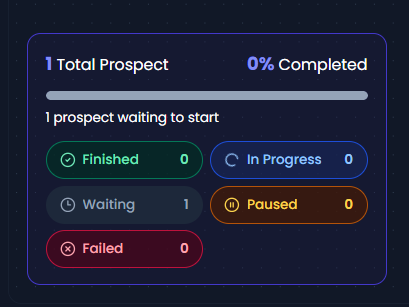
Every prospect added to a campaign is assigned a status based on their current progress within the campaign workflow. These statuses help users track campaign performance, monitor prospect progression, identify issues, and understand campaign completion metrics.
The available campaign statuses are:
- In Progress
- Waiting
- Paused
- Failed
- Finished
In Progress
A prospect is marked as In Progress when they are actively moving through the campaign workflow.
This means:
- The prospect has entered the campaign successfully.
- Campaign actions are currently being executed.
- The prospect has not yet reached the end of the workflow.
- The campaign is not paused or waiting for a future scheduled action.
Examples
- A connection request is being processed.
- A message is being sent.
- The prospect is moving from one action node to another.
Waiting
A prospect is marked as Waiting when they are temporarily waiting for a scheduled action or delay period to complete before the next campaign action can be executed.
This is a normal campaign state and does not indicate any issue.
Examples
- Waiting 3 days before sending a follow-up message.
- Waiting until working hours begin.
- Waiting for the next scheduled campaign action.
- Waiting for daily LinkedIn limits to become available.
Important Notes
- Waiting prospects are still considered active campaign participants.
- They will automatically move back to In Progress when the scheduled action becomes due.
- No user action is required.
Paused
A prospect is marked as Paused when campaign execution has been intentionally or automatically stopped before it reaches its end.
Common Reasons
- The prospect replied to a message.
- A reply detection rule paused the campaign.
- A user manually paused the prospect.
- A campaign condition stopped further automation.
Important Notes
- No additional actions are executed while paused.
- The prospect remains associated with the campaign.
- Paused prospects have not completed the campaign.
Failed
A prospect is marked as Failed when a campaign action cannot be executed successfully and the prospect can no longer continue through the workflow automatically.
Common Reasons
- LinkedIn action failure.
- Invalid or unavailable LinkedIn profile.
- Connection request could not be sent.
- Message delivery failure.
- LinkedIn restrictions or account limitations.
- Other system or platform errors preventing action execution.
Important Notes
- Failed prospects do not continue progressing through the campaign.
- The failed reason can be reviewed from the campaign details.
- Users may need to take manual action depending on the failure reason.
Finished
A prospect is marked as Finished only after reaching the final node of the campaign workflow.
Regardless of the campaign structure, a prospect must reach an End node to be considered completed.
Examples
- All follow-up messages have been sent successfully.
- The prospect completed an alternate workflow branch that ended at an End node.
- The final campaign action was executed successfully.
Special Scenario: Prospect Replies Before Campaign Completion
A common scenario is:
- Prospect enters the campaign.
- Automated actions are executed.
- Prospect replies.
- Campaign is paused automatically.
- Conversation continues manually.
In this case:
- The prospect remains Paused.
- The prospect does not become Finished.
- Manual conversations do not affect campaign completion status.
- Only reaching an End node marks a prospect as Finished.
How Campaign Completion Percentage Is Calculated
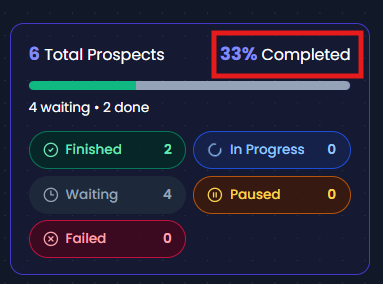
Campaign completion percentage is based only on prospects that successfully reach the End node
Formula
Completion Percentage = (Finished Prospects ÷ Total Prospects) × 100
Where:
- Total Prospects = All prospects added to the campaign.
- Finished Prospects = Only prospects that reached the campaign End node.
The following statuses are not counted as completed:
- In Progress
- Waiting
- Paused
- Failed
Example
| Status | Count |
| Finished | 12 |
| In Progress | 7 |
| Waiting | 25 |
| Paused | 341 |
| Failed | 5 |
| Total Prospects | 390 |
Calculation
Completion Percentage = (12 ÷ 390) × 100
= 3.08% (approximately 3%)
This means:
- 12 prospects completed the campaign.
- 7 are actively progressing.
- 25 are waiting for future actions.
- 341 are paused.
- 5 encountered failures.
- Only the 12 finished prospects contribute to the completion percentage.
Frequently Asked Questions
What is the difference between In Progress and Waiting?
In Progress means an action is currently being executed or the prospect is actively moving through the workflow.
Waiting means the prospect is waiting for a scheduled delay, working hours, quota availability, or the next campaign action.
Why is my prospect showing as Waiting?
The prospect is currently waiting for a future action to become eligible for execution. Once the scheduled time arrives, the prospect will automatically continue through the campaign.
Why is my prospect marked as Failed?
A campaign action could not be completed successfully due to a LinkedIn limitation, profile issue, message failure, or another execution error.
Does a reply make a prospect Finished?
No. A reply usually pauses the prospect in the campaign. The prospect is only marked as Finished if they reach the campaign's End node.
Are Failed prospects included in campaign completion?
No. Failed prospects are included in the total campaign count but are not counted as completed.
Are Waiting prospects included in campaign completion?
No. Waiting prospects are still active participants and have not completed the campaign.
Why doesn't my completion percentage match the number of active prospects?
Completion percentage only measures how many prospects successfully reached the End node. Prospects that are In Progress, Waiting, Paused, or Failed are not considered completed and therefore do not contribute to the completion percentage.